

What is screw-bugs?
The two products, screw-bugs and screw-bugs Cloud, and which one you need.
screw-bugs tests your web app in a real browser and writes a report: what worked, what broke, with screenshots and video.
- Want your coding agent to check its work on your machine? Use
screw-bugs. It's free. - Want a link your team can open? Share the report with screw-bugs Cloud.
Try it: paste this into Claude Code, Codex, Cursor, VS Code or OpenCode.
Set up screw-bugs in this project: run npx -y screw-bugs@latest setup --agent with the id of the agent you are (claude, codex, cursor, vscode or opencode). Then tell me how to load it in you, and give me a first message to paste.
Then ask it: "Use screw-bugs to check that sign-up works." More on Install.
Got a report link from someone? Here's what to tell your agent.
What you get
A report like this one, from a real run on a team chat app; it found 2 bugs (open the full report):
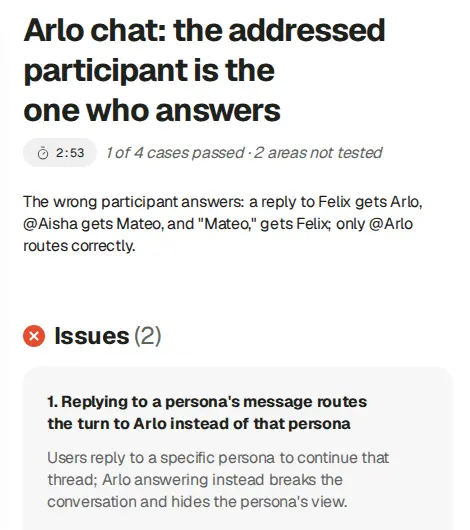
Unlike scripted end-to-end tests, nobody writes test code: your agent turns plain words into the steps. Why we built it this way.
The two products
screw-bugs | screw-bugs Cloud | |
|---|---|---|
| Runs on | Your computer | Our servers |
| Decides the test | Your coding agent or you | Claude, from your PR (not open yet) |
| You get | A report on your machine | A report link anyone can open |
| Cost | Free, open source (MIT) | Sharing free; runs not open yet |
| Start it from | Your agent, or the CLI | Share in a local report; PR comments (soon) |
Both write the same report: Cloud runs use the screw-bugs engine.
Cloud runs aren't open yet
Only the screw-bugs team can start Cloud runs for now. Sharing reports is open to everyone.
For agents: /llms.txt lists every page as Markdown.