

Reports
What a run produces, how the agent's findings join it, and how to open the report.
Every run that ends writes a status per case, an evidence pack, a report and a walkthrough into .screw-bugs/runs/<job-id>/. The agent's write-up (findings) is optional and is added on top.
Status per case
Code sets every status. Findings can mark a case failed, never make one pass.
| Status | Meaning |
|---|---|
passed | Every step ran and every expectation held |
failed | An expectation did not hold (including an HTTP error status) |
blocked | A step could not run, such as a target not found or a failed page load |
not_verified | Never reached: no browser, or the run was stopped |
The run folder
| File | What it is |
|---|---|
job.json | The job as given |
ledger.json | Status and reason of every case, and when each case and step ran in the video |
evidence/ | Screenshots, each with a .json of the page state at that moment |
video/ | One video per session, such as session-1.webm |
evidence.json | The evidence pack the agent reads |
live.html | A page to follow the run while it goes |
report.html | The report (report-interrupted.html for a run whose process died) |
walkthrough.html | The video with every step as a clickable script |
findings.json, annotated/ | The agent's write-up and screenshots with its highlights drawn in |
Findings
After the run, run_status gives the agent a compact evidence pack: per case the status, reason, screenshot IDs and timecodes. The agent then sends its write-up with submit_findings (CLI: screw-bugs findings <job-id> <file|->).
- Slots: a
headline,fixeswithevidence, per casedid,worked,didnt,failed,highlightsandkeyMoments, thennotTestedandnextTests. - Checked: case IDs, screenshot IDs and timecodes must come from that run. A write-up that doesn't fit is rejected (exit code 6) with one line per problem.
- Labelled: the report shows the write-up as the agent's.
Full shape and limits: the "Findings" section of the screw-bugs README, or npx -y screw-bugs@latest schema findings.
Report and walkthrough
report.html: the run's video beside the verdict, the issues (most severe first, with evidence side by side) and one card per case with its screenshots.walkthrough.html: the video with every step in run order. Each row seeks the video; a cursor overlay shows where the mouse pressed and what was typed.- Both are single self-contained files: they open from disk and survive the folder being zipped or moved.
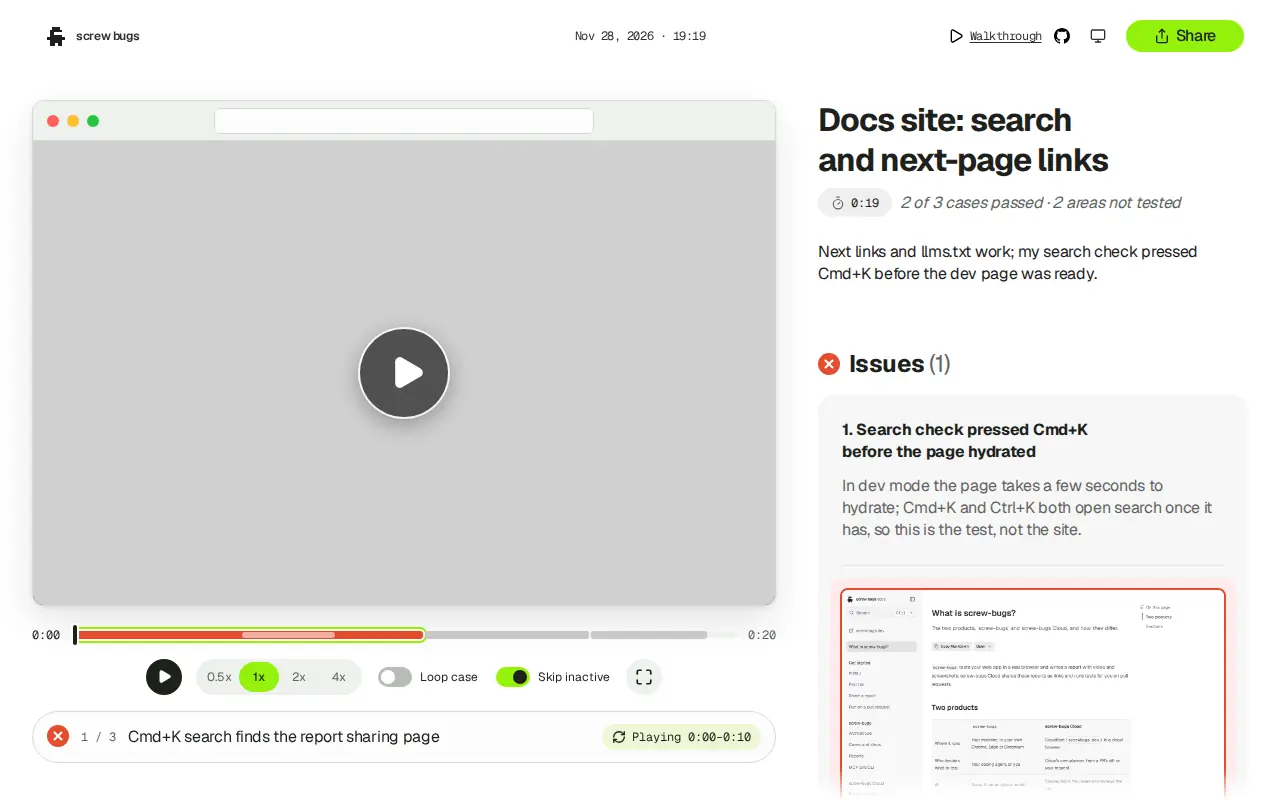
Viewing reports
Open report.html from the run folder in a normal browser. Browsers built into coding tools can't open file://, so the MCP server and the CLI give an http:// URL on a local report server instead.
screw-bugs report <job-id> --serve             # write the report and serve it until Ctrl+C
screw-bugs walkthrough <job-id> --serve # the same for the walkthrough- Port: each project gets a stable port in 41000–41999, so links keep working across sessions.
- Other devices: with Tailscale running, the server listens at this machine's MagicDNS name. Set
SCREW_BUGS_REPORT_HOST=127.0.0.1to keep it on this machine. - Off:
SCREW_BUGS_SERVE=0gives paths instead of URLs. - Share: a report opened over the server has a Share button that puts it on screw-bugs Cloud. See Share a report.
In CI
With CI=true (or no terminal), screw-bugs never waits for input, and commands print paths, not report URLs. run exits 1 unless every case passed.
npx -y screw-bugs@latest run --spec job.json
npx -y screw-bugs@latest report <job-id> --format markdown   # a short summary to paste into a pull request
The Markdown summary has the headline, counts, what to fix and the failed cases, and embeds no images. Exit codes: MCP and CLI.
NextMCP and CLI